Build Distribution
Upload Flutter builds to Sentry for distribution to internal teams and beta testers.
This feature is available only if you're in the Early Adopter program. Features available to Early Adopters are still in-progress and may have bugs. We recognize the irony.
Build Distribution helps you securely distribute iOS and Android builds to your internal teams and beta testers. Streamline your distribution workflow with automated uploads from CI.
Accepted Formats: XCArchive
Upload Mechanisms: Fastlane Plugin or Sentry CLI
The Fastlane plugin can be used to upload XCArchive or IPA builds to Sentry. On GitHub Actions, Fastlane will automatically detect your build's metadata and include it in the upload. In other Continuous Integration (CI) environments, you may need to manually set metadata values.
Uploading IPA files requires Sentry Fastlane plugin version 2.0.0-rc.3 or later. XCArchive uploads are supported in earlier versions.
Configure the Sentry Fastlane plugin (version
2.2.0):Copiedbundle exec fastlane add_plugin fastlane-plugin-sentrySet up
SENTRY_AUTH_TOKENin your environment (you can generate a token here)In
FastFile, add a call tosentry_upload_buildafter your build step.Uploading an XCArchive (preferred):
When using
build_ios_app, the XCArchive path is automatically detected fromSharedValues::XCODEBUILD_ARCHIVE:FastfileCopiedlane :upload_to_sentry do build_ios_app( scheme: 'YourScheme', configuration: 'Release' ) sentry_upload_build( org_slug: 'your-org', project_slug: 'your-project', build_configuration: 'Release' ) endYou can also explicitly specify the
xcarchive_path:FastfileCopiedlane :upload_to_sentry do sentry_upload_build( org_slug: 'your-org', project_slug: 'your-project', xcarchive_path: 'path/to/YourApp.xcarchive', build_configuration: 'Release' ) endUploading an IPA:
When using
build_ios_app, the IPA path is automatically detected fromSharedValues::IPA_OUTPUT_PATH.FastfileCopiedlane :upload_to_sentry do build_ios_app( scheme: 'YourScheme', configuration: 'Release' ) sentry_upload_build( org_slug: 'your-org', project_slug: 'your-project', build_configuration: 'Release' ) endTo upload an IPA instead of the XCArchive, explicitly specify
ipa_path:FastfileCopiedlane :upload_to_sentry do build_ios_app( scheme: 'YourScheme', configuration: 'Release' ) sentry_upload_build( org_slug: 'your-org', project_slug: 'your-project', ipa_path: 'path/to/YourApp.ipa', build_configuration: 'Release' ) endAfter an upload has successfully processed, confirm the metadata is correct in the Sentry UI
The Fastlane plugin automatically detects the following build metadata. If needed, the metadata values can be overridden by passing parameters to sentry_upload_build:
Fastfilesentry_upload_build(
org_slug: 'your-org',
project_slug: 'your-project',
xcarchive_path: 'path/to/YourApp.xcarchive', # or ipa_path: 'path/to/YourApp.ipa'
build_configuration: 'Release',
# Optional metadata overrides:
head_sha: 'abc123',
base_sha: 'def456',
vcs_provider: 'github',
head_repo_name: 'organization/repository',
base_repo_name: 'organization/repository',
head_ref: 'feature-branch',
base_ref: 'main',
pr_number: '42'
)
See the Fastlane repo for more information.
Install the sentry-cli (version
3.3.0)We recommend using the latest version for the best possible experience, but at a minimum version
2.58.2is required.Authenticate the Sentry CLI by following these steps
Build your app to create an XCArchive (preferred) or IPA
Invoke the following CLI command to trigger the upload:
Copiedsentry-cli build upload app.xcarchive \ --org your-org \ --project your-project \ --build-configuration ReleaseAfter an upload has successfully processed, confirm the metadata is correct in the Sentry UI
Accepted Formats: APK (preferred) | AAB
- APK: Distributed as uploaded. You must ensure uploaded APKs are properly signed and universal (if required) before uploading. Using a consistent signing key allows users to update previously installed builds.
- AAB (Android App Bundle): Build Distribution automatically converts AABs to universal APKs, but signs each upload with a unique key, which prevents users from updating previously installed builds.
Upload Mechanisms: Gradle | Sentry CLI
The Gradle plugin automatically detects build metadata from your git repository. On GitHub Actions, all metadata is automatically detected. On other CI systems, you may need to manually set some values using the vcsInfo extension.
- Configure the Sentry Android Gradle plugin with at least version
6.1.0 Set the auth token as an environment variable to be used when running your release build.
Copiedexport SENTRY_AUTH_TOKEN=___ORG_AUTH_TOKEN___
Enable uploading for distribution for CI builds.
build.gradle.ktsCopiedsentry { distribution { enabled = providers.environmentVariable("GITHUB_ACTIONS").isPresent } }
Invoke the following Gradle tasks to build your app and trigger the upload.
aabCopied./gradlew bundleRelease
After an upload has successfully processed, confirm the metadata is correct in the Sentry UI
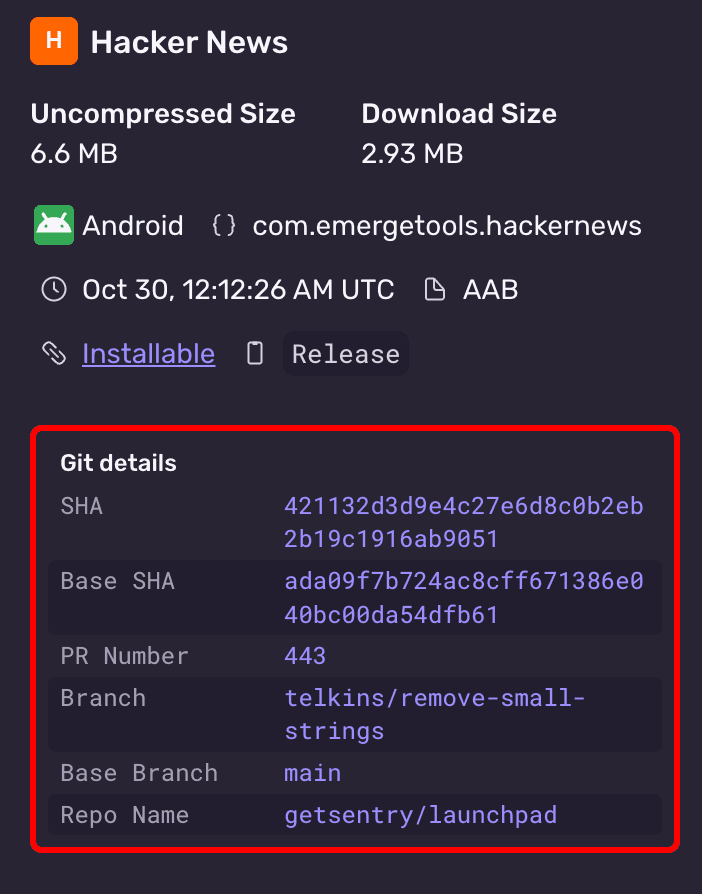
Overriding Metadata
The Gradle plugin automatically detects build metadata from your git repository. On GitHub Actions, all metadata is automatically detected. On other CI systems, you may need to manually set some values using the vcsInfo extension.
Configure overrides in your Gradle build configuration:
build.gradle.ktssentry { distribution { enabled = providers.environmentVariable("GITHUB_ACTIONS").isPresent } vcsInfo { headSha.set("abc123") baseSha.set("def456") vcsProvider.set("github") headRepoName.set("organization/repository") baseRepoName.set("organization/repository") headRef.set("feature-branch") baseRef.set("main") prNumber.set(42) } }
Available vcsInfo properties:
| Property | Type | Description |
|---|---|---|
headSha | String | Current commit SHA |
baseSha | String | Base commit SHA (for comparison) |
vcsProvider | String | VCS provider (e.g., "github") |
headRepoName | String | Repository name (org/repo format) |
baseRepoName | String | Base repository name |
headRef | String | Branch or tag name |
baseRef | String | Base branch name |
prNumber | Int | Pull request number |
Install the sentry-cli (version
3.3.0)We recommend using the latest version for the best possible experience, but at a minimum version
2.58.2is required.Authenticate the Sentry CLI by following these steps
Build your app to create an AAB (preferred) or APK
Invoke the following CLI command to trigger the upload:
Copiedsentry-cli build upload app.aab \ --org your-org \ --project your-project \ --build-configuration ReleaseAfter an upload has successfully processed, confirm the metadata is correct in the Sentry UI
Once builds are uploaded to Sentry, your team members and beta testers can download them through the Sentry web interface.
- Open the URL printed to the console after uploading the build
- Click the Install button on the right side of the page
- Either scan the QR code from a mobile device or click the Download button to download the build directly
After downloading, you can install the build directly on your iOS device. For more information on installing enterprise apps, see Apple's documentation on installing custom apps.
After downloading, you can install the APK directly on your Android device. You'll need to enable installing apps from unknown sources:
- Android 8.0 and higher: Navigate to the Install unknown apps system settings screen to enable app installations from your browser or file manager.
- Android 7.1.1 and lower: Enable the Unknown sources setting in Settings > Security.
For more information, see Android's documentation on unknown sources.
We use build metadata to organize builds in the UI and ensure correct comparisons.
| Field | Description |
|---|---|
org* | Sentry organization slug |
project* | Sentry project slug |
build-configuration* | Build configuration describing how the app was built, for example Release or Debug or Release-Bazel |
head-sha | Current commit SHA |
base-sha | Base commit SHA (for comparisons, recommended to use the branch's merge-base) |
vcs-provider | VCS provider name (for example github, gitlab, bitbucket, azure, github_enterprise). If not provided, the provider will be auto-detected from the git remote URL. Note: Only github and github_enterprise are supported for status checks. |
head-repo-name | Repository name (org/repo) |
pr-number | Pull request number |
head-ref | Branch or tag name |
base-ref | Base branch name |
install-group | Install group(s) to control update visibility between builds. Can be specified multiple times |
* required field
Build configuration metadata keeps comparisons scoped to like-for-like builds. The Android Gradle plugin sends the build variant (for example, freeDebug or paidRelease). On iOS, set this to your Xcode build configuration, such as Debug, Staging, or Release.
Our documentation is open source and available on GitHub. Your contributions are welcome, whether fixing a typo (drat!) or suggesting an update ("yeah, this would be better").