Size Analysis
Upload Android builds to Sentry for Size Analysis.
Size Analysis helps monitor your mobile app's size in pre-production to prevent unexpected size increases (regressions) from reaching users. Aside from being courteous to your users, a smaller app size helps boost installation and retention rates, especially for customers with limited storage or slower connections.
Size Analysis is most effective when part of your CI pipeline. To set up, follow our guide on integrating into CI.
Accepted Formats: AAB (preferred) | APK
Upload Mechanisms: Gradle | Sentry CLI | Fastlane Plugin
The Gradle plugin automatically detects build metadata from your git repository. On GitHub Actions, all metadata is automatically detected. On other CI systems, you may need to manually set some values using the vcsInfo extension.
- Configure the Sentry Android Gradle plugin with at least version
6.1.0 Set the auth token as an environment variable to be used when running your release build.
Copiedexport SENTRY_AUTH_TOKEN=___ORG_AUTH_TOKEN___
Enable uploading for size analysis for CI builds.
build.gradle.ktsCopiedsentry { sizeAnalysis { enabled = providers.environmentVariable("GITHUB_ACTIONS").isPresent } }
Invoke the following Gradle tasks to build your app and trigger the upload.
aabCopied./gradlew bundleRelease
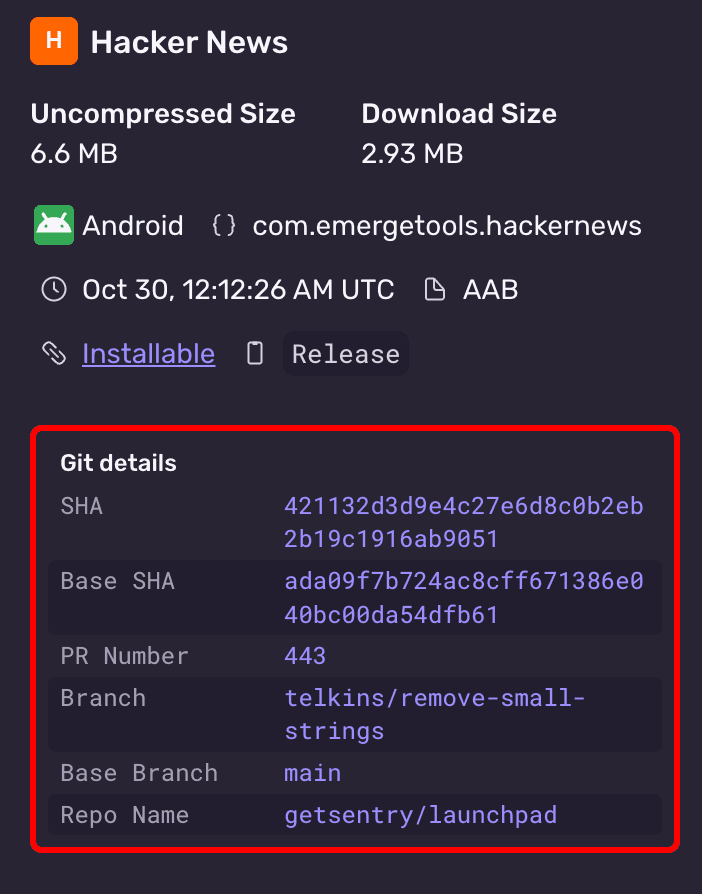
After an upload has successfully processed, confirm the metadata is correct in the Sentry UI
Overriding Metadata
The Gradle plugin automatically detects build metadata from your git repository. On GitHub Actions, all metadata is automatically detected. On other CI systems, you may need to manually set some values using the vcsInfo extension.
Configure overrides in your Gradle build configuration:
build.gradle.ktssentry { sizeAnalysis { enabled = providers.environmentVariable("GITHUB_ACTIONS").isPresent } vcsInfo { headSha.set("abc123") baseSha.set("def456") vcsProvider.set("github") headRepoName.set("organization/repository") baseRepoName.set("organization/repository") headRef.set("feature-branch") baseRef.set("main") prNumber.set(42) } }
Available vcsInfo properties:
| Property | Type | Description |
|---|---|---|
headSha | String | Current commit SHA |
baseSha | String | Base commit SHA (for comparison) |
vcsProvider | String | VCS provider (e.g., "github") |
headRepoName | String | Repository name (org/repo format) |
baseRepoName | String | Base repository name |
headRef | String | Branch or tag name |
baseRef | String | Base branch name |
prNumber | Int | Pull request number |
Install the sentry-cli (version
3.3.0)We recommend using the latest version for the best possible experience, but at a minimum version
2.58.2is required.Authenticate the Sentry CLI by following these steps
Build your app to create an AAB (preferred) or APK
Invoke the following CLI command to trigger the upload:
Copiedsentry-cli build upload app.aab \ --org your-org \ --project your-project \ --build-configuration ReleaseAfter an upload has successfully processed, confirm the metadata is correct in the Sentry UI
The Fastlane plugin can be used to upload AAB or APK builds to Sentry. On GitHub Actions, Fastlane will automatically detect your build's metadata and include it in the upload. In other Continuous Integration (CI) environments, you may need to manually set metadata values.
Uploading AAB and APK files requires Sentry Fastlane plugin version 2.0.0-rc.3 or later.
Configure the Sentry Fastlane plugin (version
2.2.0):Copiedbundle exec fastlane add_plugin fastlane-plugin-sentrySet up
SENTRY_AUTH_TOKENin your environment (you can generate a token here)In
FastFile, add a call tosentry_upload_buildafter your build step.Uploading an AAB (preferred):
When using the
gradleaction withbundletask, the AAB path is automatically detected fromSharedValues::GRADLE_AAB_OUTPUT_PATH.FastfileCopiedlane :upload_to_sentry do gradle( task: 'bundle', build_type: 'Release' ) sentry_upload_build( org_slug: 'your-org', project_slug: 'your-project', build_configuration: 'Release' ) endYou can also explicitly specify
aab_path:FastfileCopiedlane :upload_to_sentry do gradle( task: 'bundle', build_type: 'Release' ) sentry_upload_build( org_slug: 'your-org', project_slug: 'your-project', aab_path: 'app/build/outputs/bundle/release/app-release.aab', build_configuration: 'Release' ) endUploading an APK:
When using the
gradleaction withassembletask, the APK path is automatically detected fromSharedValues::GRADLE_APK_OUTPUT_PATH.FastfileCopiedlane :upload_to_sentry do gradle( task: 'assemble', build_type: 'Release' ) sentry_upload_build( org_slug: 'your-org', project_slug: 'your-project', build_configuration: 'Release' ) endYou can also explicitly specify
apk_path:FastfileCopiedlane :upload_to_sentry do gradle( task: 'assemble', build_type: 'Release' ) sentry_upload_build( org_slug: 'your-org', project_slug: 'your-project', apk_path: 'app/build/outputs/apk/release/app-release.apk', build_configuration: 'Release' ) endAfter an upload has successfully processed, confirm the metadata is correct in the Sentry UI
The Fastlane plugin automatically detects the following build metadata. If needed, the metadata values can be overridden by passing parameters to sentry_upload_build:
Fastfilesentry_upload_build(
org_slug: 'your-org',
project_slug: 'your-project',
aab_path: 'path/to/app.aab', # or apk_path: 'path/to/app.apk'
build_configuration: 'Release',
# Optional metadata overrides:
head_sha: 'abc123',
base_sha: 'def456',
vcs_provider: 'github',
head_repo_name: 'organization/repository',
base_repo_name: 'organization/repository',
head_ref: 'feature-branch',
base_ref: 'main',
pr_number: '42'
)
See the Fastlane repo for more information.
We use build metadata to organize builds in the UI and ensure correct comparisons.
| Field | Description |
|---|---|
org* | Sentry organization slug |
project* | Sentry project slug |
build-configuration* | Build configuration describing how the app was built, for example Release or Debug or Release-Bazel |
head-sha | Current commit SHA |
base-sha | Base commit SHA (for comparisons, recommended to use the branch's merge-base) |
vcs-provider | VCS provider name (for example github, gitlab, bitbucket, azure, github_enterprise). If not provided, the provider will be auto-detected from the git remote URL. Note: Only github and github_enterprise are supported for status checks. |
head-repo-name | Repository name (org/repo) |
pr-number | Pull request number |
head-ref | Branch or tag name |
base-ref | Base branch name |
install-group | Install group(s) to control update visibility between builds. Can be specified multiple times |
* required field
Build configuration metadata keeps comparisons scoped to like-for-like builds. For example, on a PR status check, the comparison will only be made for builds with the same build configuration. This is important because release and debug builds can be drastically different in size due to compiler optimizations, minification (R8/ProGuard), and resource shrinking. Comparing a debug build against a release build would give misleading results.
The Android Gradle plugin automatically sends the build variant as the build configuration. A build variant is the combination of a build type and product flavor:
| Component | Examples | Description |
|---|---|---|
| Build type | debug, release | Defines build settings like minification and debuggability |
| Product flavor | free, paid, demo | Defines different versions of your app (optional) |
| Build variant | debug, release, freeDebug, paidRelease | The combination of build type + flavor |
For apps without product flavors, the build variant is just the build type (for example, release). For apps with flavors, it's the combination (for example, freeRelease or paidDebug).
If your app flavors are comparable you may want to change the build_configuration to be set to the build type alone.
We strongly recommend integrating Size Analysis into your CI pipeline. Follow our guide on getting set up in CI.
Our documentation is open source and available on GitHub. Your contributions are welcome, whether fixing a typo (drat!) or suggesting an update ("yeah, this would be better").